C. Everyday records — Reading Log
Good for: anyone who wants to remember the books they read, or who needs records for a book club or class. Instead of flags, the Reading Log template asks you the same 3 questions each time you record a book.
When finished: a book like "Kim Haru's Reading Notes 2026" that gathers the books you read this year in date order.
What you need
- Books you have read (photos of the covers help)
1. The questions asked every time
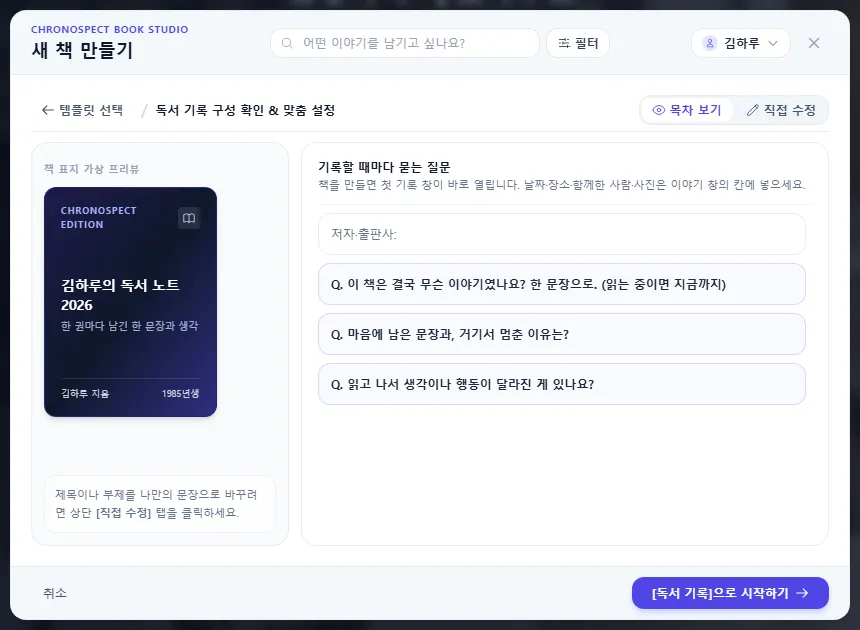
- Author and publisher
- Q. What was this book really about? Say it in one sentence. (If you are still reading, so far.)
- Q. Which sentence stayed with you, and why did you stop there?
- Q. Did anything change in your thinking or actions after reading it?
Answering just the first question is fine. Unanswered questions are removed when you save.
2. Steps
- Go to Create New Book → the Daily Life & Notes tab → choose Reading Log and start. When the book is made, the window for your first entry opens right away — Make your first book
- Write the book's name as the title and write your answers under the questions. Use the day you finished it as the date.
- Take a photo of the book cover and add it. On a phone, you can take and upload it right from the story window — Write in the story window
- For your next book, click Add New Story on the timeline and a window with the same questions opens.
- At the end of the year, page through your year of reading in Story View, and display your books like a bookshelf in the Timeline Gallery — Story View, Timeline Gallery
TipIf you choose emotions, the Timegraph shows as a curve which books moved you the most.
3. Common questions
| Question | Answer |
|---|---|
| Do I need a new book every year? | You can keep adding to one book. The free plan allows 20 stories per book, so if you read a lot, make a new book each year. |
| Can I write about a book I am still reading? | Yes. As the first question says, "(if you are still reading, so far)" — write about what you have read so far and update it later. |
Similar examples: Movie & Drama Notes · Exhibition & Museum Visits · Concert & Performance Notes · Live Sports Log · Lecture & Learning Notes — all work the same way (questions each time you record).
Check
- Each book you read has its own story.
- In Story View, the books you read appear in date order.
If you get stuck
- The questions disappeared
- Unanswered questions are removed when you save. They come back when you write a new story.
Next chapter → Part 3 troubleshooting — I cannot log in
This chapter matches the screens as of 2026-10-09. Button names update automatically with the app.