A. Memoir — Make A Tribute to My Parents
Good for: adult children who want to record their parents' stories, or anyone preparing a gift for a 70th or 80th birthday or Parents' Day. The child uses the screen; the parents only need to tell their stories.
When finished: a book with a cover like "Mother (name)'s Radiant Days" that you can send to your parents' phone or print as a PDF gift.
What you need
- The child's account (your parents do not need their own)
- Your parent's year of birth and old photos (just take pictures of them with your phone)
1. Make your parent the main character and choose the template
In the new book window, use the main character button at the top right. Under Relationship to this person, choose Mother (or Father), enter the name and year of birth, then choose A Tribute to My Parents.
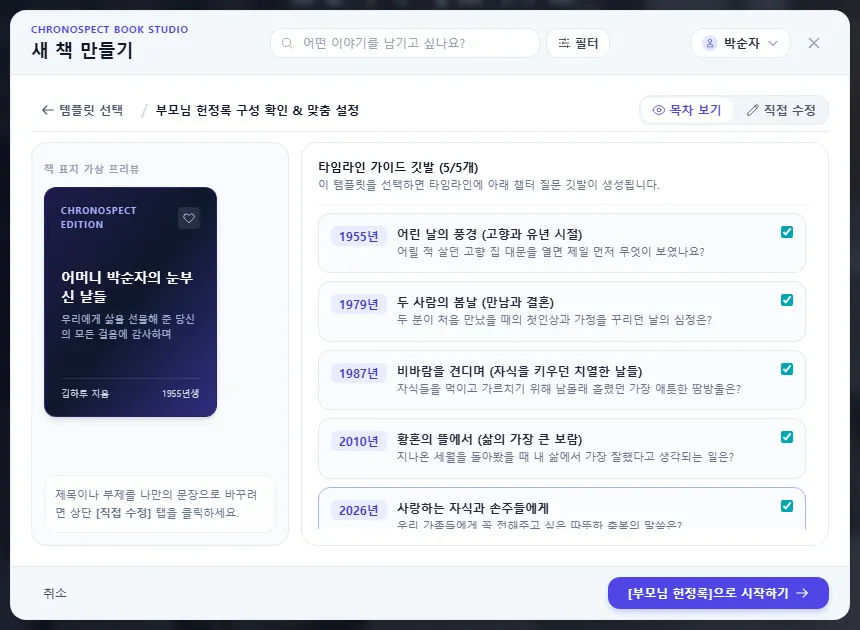
Scenes of childhood → their springtime together (meeting and marriage) → weathering the storms (the years of raising children) → in the garden of twilight → to my beloved children and grandchildren. These 5 flags are placed to match your parent's age.
2. Steps
- Pick a flag and ask your parent its question. Start with something easy, like "When you opened the gate of your childhood home, what did you see?"
- Write down what you hear in the story window. Keeping your parent's own way of speaking makes it even better. You can use your phone's voice input too — Write in the story window
- Take pictures of old photos with your phone and send them by QR — Send photos from your phone in Write in the story window
- Add the people who were there (siblings, relatives) and places, so you can later gather stories by person or place.
- Set the Story View text size to 110–120%, show it to your parents and ask what to fix — Story View and Read book
- Send the link to your parents' phone or print a PDF for them — Share your book with a link, Download a print-ready PDF
Tip30 minutes and one flag at a time is plenty. If a story gets long, split it into two stories with different dates.
3. Common questions
| Question | Answer |
|---|---|
| Do my parents need their own account? | No. Just change the main character to your parent in your own account. The cover will say "by (your name)". |
| They do not remember exact dates | If you only know the year, January 1 is fine. As long as the order is right, the stories land in the right place in the book. |
| I want my siblings to see it too | Send it with a share link and they can see it without signing up. You can also add a password. |
Similar examples: Organize your life with Classic Chronicle · People I Met (episodes by relationship) · Letters Never Sent
Check
- All 5 flags have your parent's stories and photos.
- The book opens from the link on your parent's phone.
If you get stuck
- The cover does not show my parent's name
- Check the name in the main character settings when you make the book. After the book is made, you can change the title in File → Save.
Next chapter → My Experience Portfolio
This chapter matches the screens as of 2026-10-09. Button names update automatically with the app.